STARPWN-2026-Writeup
Space Infiltrations
| Category | Ground Operations |
| Points | 483 |
| Solves | 105 |
Description
Nothing like a bit of Corp on Corp action to warm up your hear. And your wallet.
Titan has tasked you to infiltrate YeetSat and collect information about their mission. You’ve gained access to the ground station, somewhere on their satellite the info you need is stored in flag.txt. Find it and bring it back for your reward.
Attachments: Web UI access to YeetSat ground station, GoldenImage.zip
Solution
Steps
1. Access the ground station web UI
Connect to the provided YeetSat ground station URL. The interface shows an orbital view, a STATUS panel displaying satellite telemetry, and a SEND COMMAND panel.
2. Analyze the Golden Image
The provided GoldenImage.zip contains the satellite’s onboard software including status-generator.py, which handles the status downlink. In the original version, connection.get_status() returns a code (0–3) that selects a status file to downlink:
STATUS_FILES = {
    0: "good-status.txt",
    1: "warning-status.txt",
    2: "error-status.txt",
    3: "catastrophic-status.txt",
}
3. Craft a malicious Golden Image
Modify status-generator.py so that every status code maps to flag.txt instead:
STATUS_FILES = {
    0: "flag.txt",
    1: "flag.txt",
    2: "flag.txt",
    3: "flag.txt",
}
Repackage the modified files into GoldenImage_modified.zip and upload it to the ground station via the web UI.
4. Trigger a Power-On Reset
In the SEND COMMAND panel, select CFE ES Reset with reset type Power-On Reset and send the command. This causes the satellite to reboot and load the uploaded modified Golden Image.
5. Read the flag from the STATUS panel
After reboot, the satellite begins downlinking flag.txt contents instead of the normal status messages. The STATUS panel repeatedly displays the flag.
Key Diff
- STATUS_FILES = {
-     0: "good-status.txt",
-     1: "warning-status.txt",
-     2: "error-status.txt",
-     3: "catastrophic-status.txt",
- }
+ STATUS_FILES = {
+     0: "flag.txt",
+     1: "flag.txt",
+     2: "flag.txt",
+     3: "flag.txt",
+ }
Flag
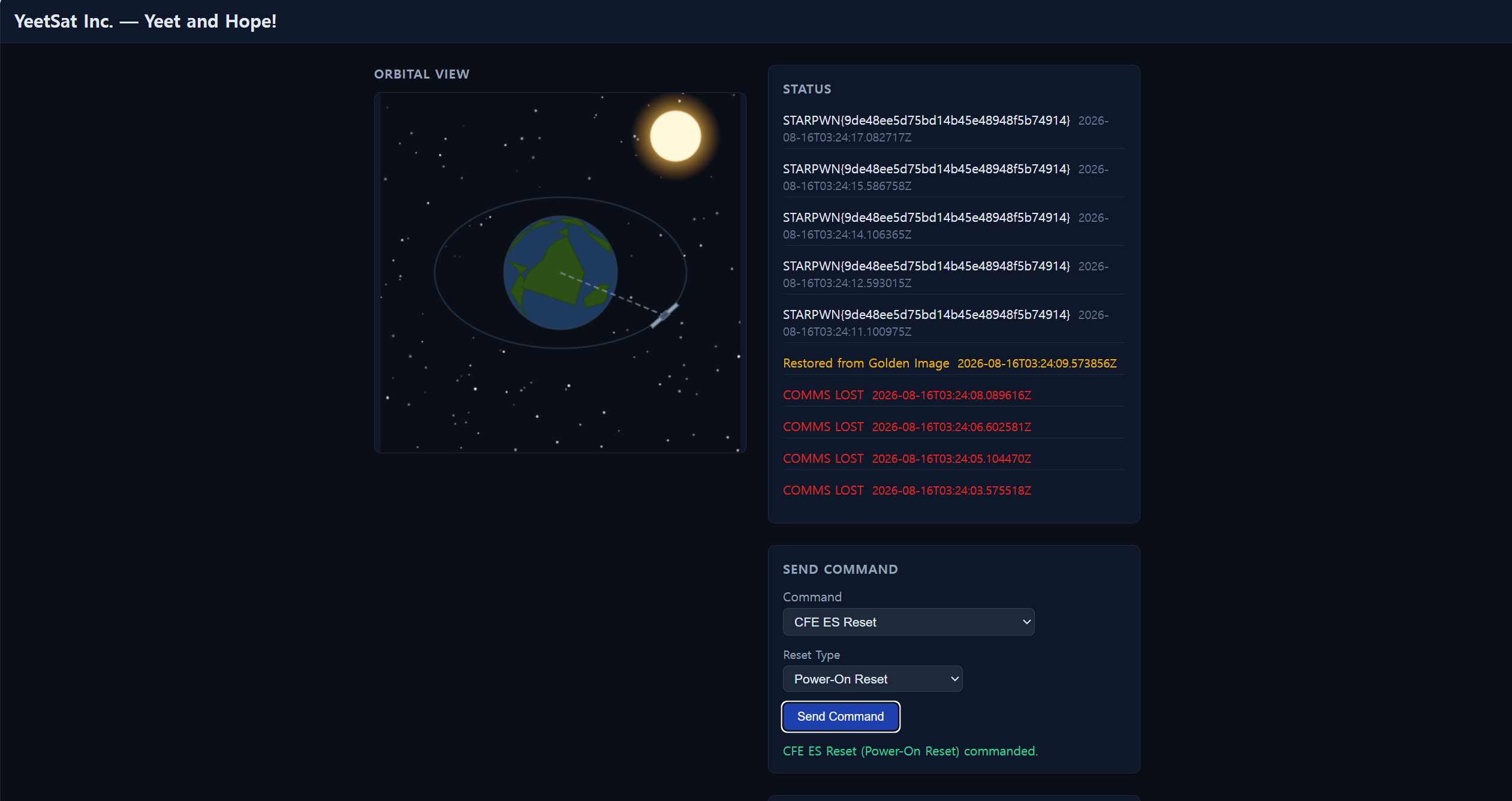
STARPWN{9de48ee5d75bd14b45e48948f5b74914}